Showing posts with label tech. Show all posts

Friday, December 10, 2010

My First Computer Build

Yeah, I've swapped parts or been minimally involved in other computer builds, but this is my first, and it was successful!


My old HP m8200n Media Center PC was dying, and I figured I'd spend money starting over rather than spending money to upgrade. So, for less than $500 (much less after I send these rebates in), I have a nice quad core system with nice graphics and good amounts of space all because I spent a few hours not being lazy.

THE PARTS - I've provided links, but prices have mostly gone up since the holiday. They're still pretty good, though, and Newegg's shipping is fast.


Power Supply, OCZ Falat1ty 550W Modular - I guess I could've gone with more power, but I checked my needs against the parts I purchased, and this is more than enough. I'm happy that I got a modular model (one that has removable connections, so you can use only the cords you need) because the cord situation got a little crazy. It's also 80 PLUS certified and is ATX12V compatible, which is good since these features maximize energy efficiency and output.
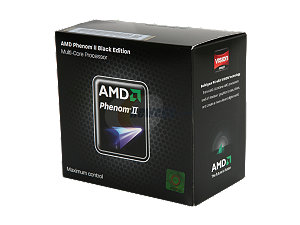

CPU, AMD Phenom II x 4 955 Black Edition - So far I haven't really done anything labor intensive, but even with rudimentary tasks I can tell the difference from my old Athlon dual-core processor. I could've gone with an Intel, but for the extra money it just wasn't worth it for me.


Motherboard, Asus M4A88TD-V EVO/USB 3 - Nice motherboard for a cheapskate who wants to skip an extra graphics card but have HD capabilities. For my old system, I bought an Nvidia 8600 GT to get dual monitor capabilities, but there's no need with this MOBO. I currently have my flat panel monitor and LCD television hooked up and it's just fine. (There's a VGA, DVI, and HDMI out; the last is awesome since you don't have to have a separate cord for audio if you use it.)


Memory, G. Skill 4 GB DDR 1333 Dual Channel - It was well priced and highly rated. So far, so good. Since I'm finally using 64-bit architecture, I'll probably add additional memory at some point.


Case, Rosewill Destroyer ATX Tower - This was probably my biggest deal. This thing is huge and roomy and has three fans, located so that your system stays cool. I had absolutely no problem building inside this thing. Best of all, it was $39.99 when I bought it. Love it!

I finished it off with an LG DVD player and a Seagate 1 TB hard drive. Unfortunately, the Western Digital Caviar Black I bought arrived dead, so I had to run out to the Tiger Direct to grab one.

The 64-bit version of Windows 7 Professional I used was super cheap since I'm a student (see http://www.microsoft.com/student/en/us/software/windows/default.aspx for details. You just need an e-mail address ending in .edu.)

So yeah, I'm pleased as punch right now.

Sunday, March 28, 2010

Got My Netflix Wii Streaming Disc

It came on friday. So far, it's pretty cool.

Formerly, I was using PlayOn with my Wii and Patriot Box Office (buggy in the latter case) in the bedroom and Boxee on my PC in the living room to stream Netflix movies.

The streaming disc beats the PlayOn interface hands down for a couple of reasons:

  • More control over the rewind/fast-forward functions. They actually work, are much faster, and allow you to move to points far along in the movie without hanging. Now the movie will rebuffer, but I'm not too bothered by that.
  • Your instant queue display is more attractive and, in most cases, more convenient. In PlayOn, you have to browse movie by movie, which is time consuming if your have a large queue. With the disc, the movies are displayed with a scrolling bar below them which allows you to go movie by movie or move from beginning to end quickly.
  • Navigation is quicker. You don't have to navigate through a million icons and folders to get to the movies. They're pretty much on the main screen.
  • You can browse movies that aren't in your queue. I thought you could do this with PlayOn, but people are listing this feature as something new, so I guess it must be.
Setup is very easy:
  1. Pop the disc into your Wii and note the activation code.
  2. Go to www.netflix.com/wii on your computer and login to your Netflix account.
  3. Enter the activation code from your tv screen into the box in your Netflix account.
  4. Done.
So far, so good. Go to www.netflix.com/wii if you need one. They're free and don't have to be sent back. Also, the selection is cool if you want to watch older movies/shows or wanna discovered a few gems here or there; hell, I haven't gotten an actual disc in the mail since April of last year. Happy streaming.

Wednesday, February 24, 2010

Learn Something For Free!!!

So, I've decided that in order to be happy, I simply must go back to school because I've completely remixed my career goals and am convinced that this one, the one I'm presently on, ain't it. (Oh, how I wish I'd come to these present realizations before the really expensive master's that's threatening to bankrupt me. Hey, you only live once!)


Now, in the thick of writing personal statements and filling out FAFSAs and attending info sessions and cutting checks for admissions applications, I've found myself taking inventory my abilities. You see, I'm going into engineering and we all know that engineers have to be solid on the math front. The problem is, the last time I took a math class was in the nineties. That's kind of a problem.

Enter the Internet and OpenCourseWare. There are schools, well-regarded ones, that offer online courses for the free. That's right, the free. Now I don't know about gaining credit and all that jive, but I do need some refresher courses, and this fits the bill like a money clip. Of these schools, MIT's offerings seem to be the most exhaustive. In addition to video lectures, they have sample projects, assignments, problem sets, tests with answers, and lecture notes, pretty much everything a real class would have.


(Adorable picture from TheBlackSpotBook's site on Etsy. Check out her adorable necklaces.)

Sunday, February 21, 2010

Wii, Netflix, and You

Bought a Wii to work out? (*snicker*)

Find that your Wii Fit board's getting a little dusty from disuse?

Stop kidding yourself and use the damned thing as Nintendo intended, to enjoy sitting on your ass.

I started my 14-day trial period using Media Mall's PlayOn software the other day, using it to stream Netflix, Hulu, and other online content through my Box Office. Unfortunately, the Box Office isn't one of the supported devices, so there is a lot of buggy behavior, particularly with Hulu and Netflix. Often, the files won't play, displaying an "invalid file" message instead. I have a Wii, though, and PlayOn just released a beta version of their software to use with the console, so I figured why not?

It was super easy.

1. Connect your Wii to your wireless network.

2. Download the free Wii Internet Channel

3. Enter 'playon.tv' into the browser (and save it as a favorite).

Assuming that you've installed PlayOn on your host computer and have it configured correctly, you can watch anything you want. Beyond Hulu, Netflix, and YouTube, there are plenty of plug-ins for other channels like Adult Swim, PBS, NBC, and more. I spent the better part of the day watching Modern Family and the '91 version of Dark Shadows.

The problem with this solution is that the Wii only supports resolutions up to 480p, and if you have a HDTV, you sure can tell. Supposedly, Netflix's Wii instant streaming disc (being released this Spring) will help this a bit, but 480p is 480p. Personally, sitting roughly six feet from my television, it doesn't bother me too much.

So yeah, it keeps getting better and better. With a mini-fridge, I may never have to leave my room again.

Wednesday, February 17, 2010

Stuff I Like

1. I just watched Ratatouille. It was soooooooooooo good. I love being late cuz I get to enjoy things like they're new, without all the fanfare.

2. Television Zombies, a fun podcast that talks about shows I love and those I probably should.

3. Vampire Diaries! Because of the great people of Television Zombies, I started watching this show on Friday. Three days later, I had devoured all 14 aired episodes. This ish is great! Ian Somerhalder (Paul from Rules of Attraction [I don't watch Lost]) plays Damon, the bad vampire brother in this modern Dark Shadows-y mash-up of awesome and schmaltz. Love it and can't wait for it to resume in march. Chuck and Tina from TZ have a separate podcast for the show, Chuck and Tina Spread VD. It's pretty good.

4. Home Theater Solutions. You may recall this post where I muddle over the home media streaming options. Well I finally got off my indecisive duff and made some decisions. Instead of a wi-fi-enabled TV, I went the media player route. And while the WD Live is ubiquitous and attractive, the Patriot Box Office gets snaps for having a wider range of media file support, a hdd bay for storage, a vocal online community, and awesome customer support.


Since I don't have an ethernet line running to the bedroom, and media players have issues playing large HD files over a wireless network, I went with this, powerline networking. It's so convenient. Plug one into your router and the other into your device in any part of the house. Apparently you should make sure that both are on the same circuit. I guess mine are cuz this is working perfectly, no stuttering or dropped signals.


This is my media player. It's so awesome. It plays all my downloaded content, has good picture quality (file dependent, of course), and is small enough not to take up much space. Two issues: the UI is not that pretty and very basic and those running Windows 7 have to manually edit their registries to access files over a network. The first issue doesn't bother me much. The second took all of two minutes to solve. As I type, New Egg is sending a 120 GB laptop hard drive to install in this baby. That way I can store media directly on the device and enable the bit torrent option. Woo hoo!


Now the problem with having all these devices--cable box, media player, television--is the profusion of remotes. Now I looked into the Logitech Harmony thing, but 70 plus for a remote is ridiculous. Instead I chose this, the NXG NX-RM505, and based on the reviews, it may be just what I need. We'll see when it gets here.

So that's it.

Sunday, January 03, 2010

Technology!

i've noticed that i have some followers. that's amazing. let me thank you all for entertaining my attempts at being entertaining.

moving on, my new semi-obsession is home entertainment technology. after snagging an old (free!) laptop from the j-o, i gained some knowledge, fixed it, and decided to trick out my home entertainment options. i bought a router and created a network and am now trying to figure out the best way to stream content from all computers to all televisions in the house.

the easiest way would be to cop (are we noticing all the mid-90s hip hop lingo? word? word.) the new wi-fi vizio. (vizio does mean value and all.) i just bought a new set, have two more months to return it, and the SV422XVT comes out this month. i could just return my set and pay the (very small) difference. it has a QWERTY bluetooth-enabled remote. have you seen it? crazy!


(thanks vizio.com)

of course i could just get an xbox 360 or playstation 3 and use either as a media extender, but i would never ever use them for gaming, so it seems like a waste.

there are other media extension options like the Western Digital TV Live device, which looks pretty sweet, but a cursory look at the reviews reveals unreliable software and a limited interface. plus, there's no netflix and my bedroom tv and computer aren't close enough to connect via cables.

what are my other options? any ideas out there?

_______________________________________________________________________

oh, and on the random tip (see!), let me implore you to consider costco, sam's club, or walmart for your hdtv purchases. they all have 90-day return policies and in addition, costco doubles the manufacturer's warranty and offers concierge service.

also, do not buy your hdmi cords in stores. they are ridiculously overpriced there. use monoprice or parts express for all your inexpensive but reliable cables needs. there's also meritline, but i've never ordered from them.